
PlayinMatch Login — Which Field, Which Code, Quick Error Fixes
PlayinMatch login needs three things: your username, email or phone in the first box, the password from your ID chat in the second, and a one-time code the first time a new phone signs in. Tap Login and the lobby opens on the same balance, in the app or a browser.

Quick PlayinMatch Login Straight From This Page
These two boxes are a preview; the working PlayinMatch sign-in opens on the next tab, and a phone it has never met will be asked for its one-time code there.
PlayinMatch Login Screen Mapped Box by Box — Easy to Follow
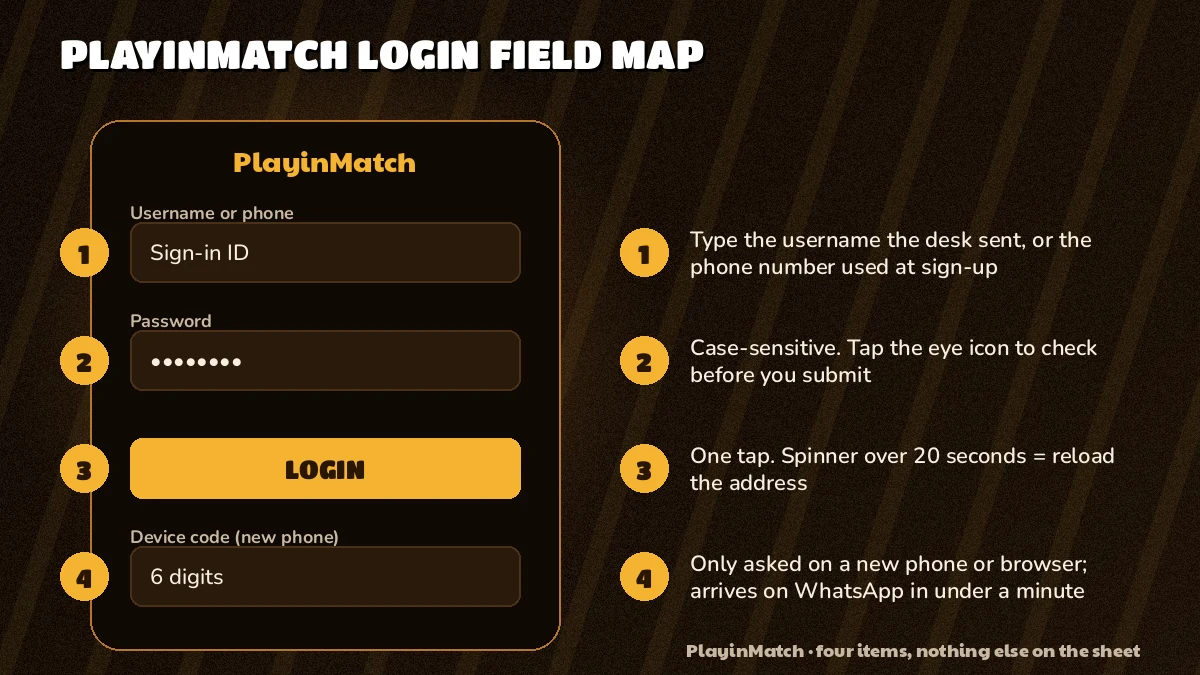
Four things live on the PlayinMatch sign-in screen, and only two of them are fields. The third is a button. The fourth, a short code, shows up only when the phone in your hand is new to the account. Most people who get stuck get stuck on the very first box, because it will take three different kinds of input and nothing on the screen says which one you gave the desk.
So here is the screen again, numbered.
PlayinMatch Login
- Username, email or phone. Type whatever the PlayinMatch account was built on. For nearly everyone that is the username they asked for in the WhatsApp chat that created the ID (the second of the two messages, right after their name). A registered email also works. A phone number works only if it is the number tied to that PlayinMatch ID, not a spare SIM.
- Password. The one that arrived with the ID in chat, or the replacement the desk gave you later. Treat it as case-sensitive: Cover22 and cover22 are two different passwords as far as the check is concerned. The eye icon at the right edge shows what you actually typed, which settles most arguments with a keyboard.
- Device code. Only on a phone or browser PlayinMatch has not seen before. A one-time code goes to the number linked to the account and usually lands within a minute. Type it once; after that the device is remembered.
- Login. Tap it once. If the lobby opens, you are done. If the form comes back empty with a message, one of the boxes above was off, and the error section further down tells you which.
Under the Login button sit a Forgot Password? link and three shortcut routes: Google, Facebook and a phone OTP. They are handy, but in practice they only help if the Google or Facebook email is the same one attached to your PlayinMatch account. If you never gave the desk an email, the plain username route is faster than hunting for which address it might be.
One more small thing people ask about. The username field does not care whether you arrive through the app or a browser tab; the same PlayinMatch details go in the same boxes in the same order. What changes between the two is only whether the phone counts as a new device, and that is the next section.
First PlayinMatch Login on a New Phone — the Quick One-Time Code
Your first PlayinMatch login on any handset runs one step longer than every login after it. That extra step is the device code, and it is the reasn a friend with your password still cannot walk into your account from their own phone.
The order looks like this. Open the PlayinMatch sign-in (the PlayinMatch app sign-in screen or a browser tab, same boxes either way). Type the username. Type the password. Tap Login. Instead of the lobby, a short screen asks for a code. Check your messages on the phone number linked to the ID, copy the digits across, confirm. Lobby.
That is the whole thing when it goes right, and it usually does, inside about a minute.
What counts as a new device is a little broader than people expect. A brand new phone, obviously. But also a different browser on your old phone, the app installed fresh after a reset, or the same browser after you cleared its stored data. PlayinMatch sees each of those as a stranger and asks once. It is mildly annoying and completely normal; there is nothing wrong with the account when it happens. The reasons the code exists at all are on the PlayinMatch safety checks page, alongside the same-name payout rule, so there is no need to repeat them here.
New phone on a Sunday morning, match starting at half past three. Typed the username wrong twice because the keyboard kept adding a capital. Third go it asked for the code, the SMS came before I had even put the old phone down, and I was on the scorecard with an hour to spare.
A few situations need thought before you switch handsets. If the number on the account is a SIM you no longer carry, the code will go to that old SIM and not to you. Sort that first, through the desk, while you can still log in on the old phone; it is far easier then than after the old phone is gone. If you share a phone with a family member who also plays, each PlayinMatch ID still passes it's own code the first time, and signing out properly before handing the phone over saves an awkward mix-up.
And if you do not have an ID yet, none of this applies. The account is created over a WhatsApp chat in two messages; the steps are on the join PlayinMatch page, and once the username and password come back, you land on the screen described above.
PlayinMatch 365 Login — the Same Easy Door, Every Day of the Year
Arrive here from a search for PlayinMatch 365 login and the screen in front of you is the one above: two boxes, one button. The number is shorthand for all-year access (the PlayinMatch sign-in has no season and no closing date), so your current ID goes in unchanged. A known phone lands in the lobby. A new one still gets the device code first.
The confusion is understandable. Several betting brands in India bolt a number onto their name, and a few of them really do run a separate site under it. PlayinMatch does not. If you already hold an ID, the 365 search leads right back to the boxes mapped above.
Two practical consequences follow. First, never register again because a page says 365 on it. A PlayinMatch ID works under every spelling people search for, so a sign-up form that insists you need a fresh account for the 365 version is almost certainly not ours; close it. Second, do not reset your password because the 365 page seemed to reject it. More often then not the address itself was blocked or mistyped, which is the second error in the next section and has nothing to do with your password at all.
There is also no season to it. The sign-in does not close between tournaments or at night; in the cricket off-season the PlayinMatch login works the same way it does during a final, and the casino tables and slots keep running when there is no match on.
Short version: 365 is a word people search, not a door you need a different key for.
Three PlayinMatch Login Errors, Each With a Real Fix
Nearly every failed PlayinMatch login lands in one of three buckets. They look different on screen, and the fix for one does nothing for the other two, so spend a second working out which one you are actually looking at before you start changing things.
- Invalid credentials
- The PlayinMatch page loaded, you filled both boxes, and it came back refusing the pair. The site is reachable, so the problem is what went into the boxes. Go in this order: retype the username by hand (no autofill, no suggestion bar), check for a capital the keyboard added, turn the eye icon on and read the password letter by letter. If you used a phone number or email in box one, try the plain username instead; it is the one detail everybody is sure the desk saved. Two careful attempts is plenty. If both fail, stop guessing and ask for a reset, which takes less time than a fifth try.
- Blocked address
- Nothing loads at all, or you get a browser notice, a blank page, or a message from your internet provider. This is not about your details. Indian ISPs block betting domains from time to time, and PlayinMatch answers by publishing a fresh address; the ID and balance are the same on every one. The current phone-friendly route is on the four-field phone sign-in screen for PlayinMatch. Whatever you do, do not reset the password over this one. It will not help, and you will just have a new password to remember on top of a page that still will not open.
- Device code not received
- Wait sixty seconds before touching anything; a PlayinMatch code normally lands well inside that. One more request is fine. Five is not, since several codes landing together leave you unsure which one the screen will accept. If the second request also shows nothing, suspect reception first (Wi-Fi calling or a spot near a window helps SMS more than people expect), and after that the account itself: a PlayinMatch ID opened years ago may still point at a number you no longer carry. The desk can change that linked number, as the next section explains.
There are rarer cases, of course. An account the desk has paused for some reason will not let you in with correct details; that shows up much like invalid credentials, which is why the advice above says two tries and then a message rather than ten tries. And once in a while the whole lobby is slow during a big match, so the Login button seems to hang. Wait for it. Tapping again and again usually just sends the same request a second time and makes the the wait longer.
If you are stuck in a way that fits none of these, a screenshot of the exact message you see is the most useful thing to send the desk. It saves a round of questions, and PlayinMatch support can usually tell from the wording which of the three you have.
Forgot the PlayinMatch Password? A Free Reset Over Chat
Stuck on the sign-in screen with a password you cannot recall? The PlayinMatch balance behind it is untouched, and getting back in takes a couple of minutes rather than a new account.
Two ways in. Tap Forgot Password? under the Login button on the sign-in screen, or skip straight to messaging the WhatsApp desk (Telegram works too). Either way, what you send is your username and a line saying you need a new password. Not the old password, not a guess at it, and not the one-time code from a previous login. The desk sets a fresh password and sends it back in the same chat; the PlayinMatch customer care desk page lists how fast replies usually come, and the same team handles code resets and account unblocks.
Then log in with the new password straight away, while the chat is still open. If you are on a new phone as well, expect the device code on top of that; it is a separate step and a reset does not skip it. Anything else to change? Probably not. The username stays exactly as it was, so does the balance, and nothing about your bets or history moves.
Harder case: you forgot the password and the phone number on the account is gone, a lost handset or a SIM you let lapse. A reset alone will not get you through, because the next PlayinMatch login on a new phone still sends its code to that old number. Say both things in the same message to the desk: the username, that you need a new password, and that the linked number has changed. Two problems in one chat is quicker than solving the first, getting stuck on the second, and starting over. Expect the desk to ask a question or two to confirm the PlayinMatch ID is yours before anything about the number moves (that is the point of the code in the first place).
A small habit saves most of this. Once you are back in, keep the password somewhere that is not the chat itself, becase a cleared WhatsApp history takes the reply with it.
Nobody chares for any of it. Not the PlayinMatch reset, not the code, not the login.
PlayinMatch Login and 365 Login — Real Search Terms, Plain Answers
PlayinMatch Login Account Details in One Place
One username and one password cover every PlayinMatch login surface: the PlayinMatch login app, a phone browser and a desktop tab. When the exact username slips your mind, the first box also takes the email or phone number registered to the ID, and the password stays whatever the desk last sent you.
A PlayinMatch login on a new device adds a one-time code, sent to the linked number. Anyone searching for a PlayinMatch login OTP or a PlayinMatch sign in code is looking at that step, and it appears only once per phone or browser.
A PlayinMatch login problem is almost always one of three: invalid credentials, a blocked address, or a code that did not arrive. The PlayinMatch password reset runs over the WhatsApp desk and is free.
PlayinMatch 365 Login Uses the Same PlayinMatch ID
Adding 365 to the query leads to the screen described in the first tab and nowhere else. Your PlayinMatch 365 login goes username box, password box, then a one-time code only if the phone is new to the account. Existing PlayinMatch login details, no extra step, no fresh ID.
Nobody needs a separate registration for 365. If a PlayinMatch 365 login page will not open, treat it as a blocked address and use the current route, since the ID and the balance carry across every address PlayinMatch publishes.
- playinmatch login
- playinmatch 365 login
- playinmatch login id
- playinmatch login password
- playinmatch login otp
- playinmatch sign in
- playinmatch login app
- playinmatch login new device
- playinmatch password reset
- playinmatch login kaise kare
- playinmatch login problem
- playinmatch account login
PlayinMatch Login Doubts Cleared — Quick Answers on Fields and Codes
Should I type a username or a phone number in the PlayinMatch login box?
Either works, as long as it belongs to your account. The first PlayinMatch login box accepts a username, a registered email or the phone number tied to the ID. Most people use the username they asked for in the WhatsApp chat, because it is the one detail they know was saved exactly.
I forgot my PlayinMatch password. What is the reset route?
Tap Forgot Password under the Login button, or message the PlayinMatch WhatsApp desk with your username. The desk sets a fresh password over chat at no charge, and you sign in with it straight away. Send the username only; the old password never needs to appear in that conversation.
Why does PlayinMatch ask for a code when I log in on a new phone?
PlayinMatch sends a one-time code whenever a phone or browser it has not seen before tries to sign in. It usually lands within a minute on the number linked to the account. Enter it once and that device is remembered, so later logins need only the username and password.
How do I fix the invalid credentials message on PlayinMatch login?
Scroll back to the WhatsApp message where your PlayinMatch ID arrived and copy the username from there instead of typing it from memory; that clears most of these errors. Paste it, enter the password slowly with the eye icon on, and if the lobby still refuses after two attempts, request a free reset from that same chat.
What does PlayinMatch 365 login mean?
It means the regular PlayinMatch login, reached through a search that happens to include 365. There is no 365 app and no 365 account to create. Type the username and password you already hold; if a result wants fresh sign-up details under that label, close it and open the current PlayinMatch address instead.
Can two phones stay logged in to one PlayinMatch ID?
A second phone can sign in once it passes the one-time device code. Whether the first session stays open alongside it is not published anywhere, so if you genuinely need both phones active at once, ask the PlayinMatch desk first instead of finding out in the middle of a match.
Is PlayinMatch login free?
Yes, signing in to PlayinMatch costs nothing. There is no fee for the login itself, for the device code or for a password reset over chat. Money only moves when you decide to deposit, and that is a separate step you take inside the lobby after you are already signed in.
Why did PlayinMatch log me out on its own?
Most automatic logouts come from a long idle spell, cleared browser data or a switch to a new address. Nothing on the account is lost: the PlayinMatch balance and any open bets stay where they were. Sign in again with the same username and password; a fresh browser may ask for the code once.