
PlayinMatch APK — Real Build Number Check Before the Install Tap
Build 4.2 is the PlayinMatch APK worth keeping. A 3.x file tends to load its splash screen, then freeze on the username box, which is where most "app not working" messages start. Chrome asks for one install permission, the package opens, Install runs for roughly a minute, and your existing ID goes into the same two fields you know from the browser (the PlayinMatch mobile login page walks through that screen). Android only: on an iPhone the exchange runs inside Safari instead.
PlayinMatch APK First Login — Quick Test of the New Build
Once build 4.2 opens, these two fields are the whole test: if your PlayinMatch username and password go through here, the install worked and the balance is where you left it.
PlayinMatch APK File Facts — Real Numbers Before the Download
Build 4.2. That is the label to look for on the PlayinMatch APK right now, and it matters more than most people expect, because an older file will usually open without complaint and then sit at the sign-in screen doing nothing at all.
The file is one Android package. Inside it you get the cricket exchange with back and lay, the casino floor, the slots shelf and the in-play sports tab, all running on the PlayinMatch ID you already use in a browser. Nothing on the phone holds money. Your balance lives on the account, so if you uninstall PlayinMatch tonight, the rupees are still sitting there when you sign in from Chrome tomorrow morning.
| What you check | What PlayinMatch build 4.2 should show |
|---|---|
| File type | A single .apk package. Not a .zip, not an .exe, not a folder of files |
| Download size | 31 MB at the last check; the PlayinMatch app download page carries the current figure |
| Android floor | Android 8.0 or newer, per the same download page |
| Account | The same PlayinMatch username and password as the website |
| Separate live build | None. In-play markets are a tab inside this one file |
PlayinMatch live APK is a common search, and it leads nowhere special. The in-play cricket, football and tennis markets people have in mind open from the sports tab of build 4.2, the same file described above (the PlayinMatch app features page lists what each tab holds). So a download advertising itself as a live edition has been rebuilt by someone outside PlayinMatch. Leave it alone.
Where the real file comes from is short to explain. Two places: the PlayinMatch download page, or the link the WhatsApp desk sends when you ask for it in chat. A file forwarded around a Telegram group is neither of those, and neither is a mod site with a countdown timer and four fake Download buttons.
PlayinMatch APK Install Order on Android — Easy Steps in Sequence
Order matters. Do these out of sequence and Android either hides the Install option or drops the file somewhere you will spend ten minutes looking for it. The run below is the one the PlayinMatch desk types out for new users on chat, give or take a screen name that differs between Samsung, Xiaomi and the rest.
- Give the browser permission first. The switch is called Install unknown apps and it lives inside the settings of whichever browser will fetch the file, Chrome on most phones. Flip it on for that one browser only. Since Android 8 the permission is granted app by app, which means Chrome getting it tells WhatsApp, Files and everything else nothing.
- Download the PlayinMatch APK. Tap the link and let it finish. Chrome may warn that files of this type can harm your device. That banner shows for every APK from every source; it says nothing about PlayinMatch in particular.
- Open the file. Tap the download notification, or go to Files and then Downloads. The name should end in .apk with nothing after it.
- Tap Install. Ten to twenty seconds on most phones. If Play Protect steps in with a warning, read what it actually says before choosing anything; the file check further down this page takes about a minute and answers the question properly.
- Sign in on the first launch. The PlayinMatch icon is now in the app drawer. Tap it, and the account you made earlier works here unchanged. Because this handset has never seen the account, an OTP gets sent before the lobby appears. Still without an ID? The desk issues those over chat; the app cannot. Which box takes which detail is shown on the PlayinMatch login fields page.
Where that switch hides depends on who made the phone, and this is honestly where most of the chat time goes. On a Samsung it tends to sit under Apps, then the three-dot menu, then Special access. Xiaomi and Redmi phones put it under Privacy protection or Special permissions, depending on the MIUI or HyperOS release. Pixel, Motorola and most Nokia handsets keep close to plain Android: Apps, Chrome, Install unknon apps. If none of that matches, type unknown into the search bar at the top of Settings. It finds the page on almost every phone the PlayinMatch desk has seen.
Download size is worth a thought too if you are on a daily mobile data pack. The PlayinMatch APK is small enough that it rarely matters, but a connection that drops for a second in the middle can leave a file that looks complete and is not, and that half-file is exactly what produces the parsing error in the table below. Wi-Fi, or at least a spot with full signal, avoids the whole thing.
That is the theory. In practice two things trip people up more then anything in the list above: an old PlayinMatch build still sitting on the phone, and a download that broke halfway on patchy mobile data. The table covers what Android says in each case.
| Android says | What it usually means for PlayinMatch | What to do |
|---|---|---|
| App not installed | An older PlayinMatch build signed differently is still installed, or storage is nearly full | Uninstall the old app, clear some space, install again |
| There was a problem parsing the package | The download cut off midway, or the phone is below the Android floor | Download again on Wi-Fi; check the Android version in Settings |
| Install button does nothing | A screen overlay is on top, such as a chat bubble or a blue-light filter | Close the bubble or filter, tap Install again |
| Blocked by Play Protect | Play Protect flags most apps from outside the Play Store | Run the file check below first, then decide |
| Opens to a blank screen | An old build pointing at an address that has since been blocked | Install build 4.2 over it |
Once the PlayinMatch APK is in and signed in, you can switch Install unknown apps back off for the browser. Not required. Tidier, though, and the next update will simply ask you to switch it on again for a moment.
PlayinMatch APK Old Version — Why It Stalls at Login, and the Quick Fix
Plenty of people go looking for a PlayinMatch APK old version on purpose. The reasons, roughly in the order the desk hears them: the new build refused to install, the phone is older and the owner assumes an older file will suit it better, or they simply preferred where the buttons used to sit.
The catch is the login. Every PlayinMatch build carries the address it talks to when you sign in. Indian ISPs block betting domains every few months, PlayinMatch moves to a fresh address when that happens (the PlayinMatch mobile address page explains the blocks), and new builds point at the new one. Old builds keep knocking on the blocked door.
They open. The lobby artwork loads from the phone's cache, so everything looks normal for a few seconds. Then the sign-in spinner turns and turns, or the app rejects a password that is perfectly correct, which is the part that sends people into a reset loop they did not need.
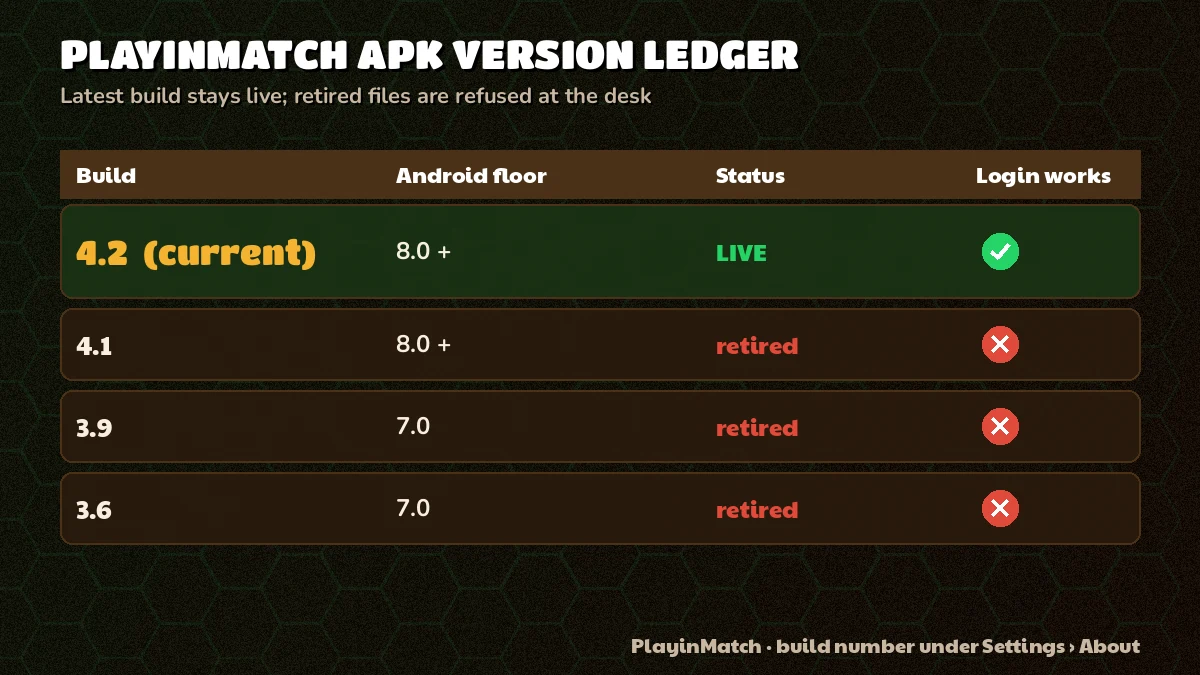
So the PlayinMatch position on old files is simple: build 4.2 is the one the desk supports, and earlier numbers are not maintained. Some keep working for a while. Most stop at login sooner or later, and nobody can tell you in advance which week that happens.
Had a build from last year still on the phone and it kept saying my password was wrong. Tried three times, reset it once. Deleted the app, put the new file on, and the same old password went through first go. Forty minutes wasted before I thought to ask.
Your money does not care which build you run. Balance, open bets, bet history and the ID itself are held on the PlayinMatch account, not on the handset, so replacing an old install loses nothing except some cached icons.
A clean swap, from old to new, looks like this. Note your username first if you only ever let the phone remember it. Uninstall the old PlayinMatch app, or leave it and install 4.2 straight over the top, which works when both files came from the same source. Open the new build, sign in, clear the OTP. Check the balance matches what you last saw. Five minutes, most of it waiting for the OTP message to arrive.
One habit stops the old-version problem from coming back. After build 4.2 is installed and signed in, delete the .apk file from Downloads. Months later, when a phone is being cleared out or someone reinstalls in a hurry, the file sitting in Downloads is the one that gets tapped, and by then it is the old PlayinMatch build all over again. Fetch a fresh copy each time instead. It costs a minute.
If the phone runs something older than Android 8, no build of the PlayinMatch APK helps, old or new. Use the browser: same ID, same balance, same lobby. It is probaly the better choice on a phone that old anyway, since the browser never needs a file update.
PlayinMatch APK Latest Version Ledger — Real Differences From Old Builds
Everything you need to compare a file in your Downloads folder with the current PlayinMatch build, in one list.
- Latest build
- 4.2. Settings, then Apps, then PlayinMatch, and the App info screen shows it as the version.
- What changed
- Mainly the sign-in route, so it reaches the current PlayinMatch address and not a blocked one. The lobby tiles, exchange markets and casino tables load from the server, which is why a new build changes less on screen than people expect.
- Why old stops at login
- It asks a blocked address to check your password. No reply comes back, so the app shows a spinner or a wrong-password message.
- Size check
- Compare the file against the figure on the download page. A PlayinMatch APK of 3 MB or 90 MB is not PlayinMatch.
- Signer check
- Keep last month's desk-sent build on the phone and tap the 4.2 file straight over it. Android only lets an update through when the key that signed it matches. So a clean update tells you both PlayinMatch files share a signer, and a package conflict error tells you they do not.
- Update path
- Fetch the file again from the download page or the desk link. There is no automatic update through the Play Store.
The signer check is the one worth remembering. It costs nothing, it needs no extra app, and its the only test on this list that a repackaged file cannot fake by renaming itself.
PlayinMatch on iOS — No APK File, an Easy Safari Route Instead
Moved from Android to an iPhone? The PlayinMatch ID made the trip with you. Password, balance and bet history sit on the account, not inside build 4.2, so the file still lying in your chat can be deleted without losing a rupee (it would only show a preview in Files anyway). That settles most searches for a PlayinMatch app download APK old version iOS before they start.
What works on an iPhone is Safari. Open the PlayinMatch site, tap Share, choose Add to Home Screen, and an icon appears that opens the lobby full screen and signs in with the same ID and password. It never needs an update because it always loads the current site; the old-version problem from the section above simply does not exist on iOS. The PlayinMatch iPhone steps show each screen in order.
Anyone offering an iOS PlayinMatch file, an IPA or a profle to install, is not offering PlayinMatch.
PlayinMatch APK File Check — Free Tests to Know the File Is Real
Four checks. None of them technical, all of them done before or during the install, and together they take about as long as the download did.
- Source. Scroll up your WhatsApp chat with the PlayinMatch desk, or reopen the download page, and match the link you used against one of those two. A file that reached you any other way, a group forward or a short URL from a stranger, fails here before you even open it.
- Name and size. The file ends in .apk and its size is close to the figure on the download page. A file named PlayinMatch.apk.zip, or one a tenth of the expected size, goes in the bin.
- Update over the old one. If a genuine PlayinMatch build is already on the phone, install the new file over it. Accepted as an update means same signer. A package conflict means the new file is somebody else's.
- Permissions on first open. PlayinMatch needs network access and, if you want alerts, notifications. A build that asks to read your SMS, your contacts or to take accessibility control of the phone has no business doing so.
A fifth sign shows up by accident. After installing, you find two PlayinMatch icons in the app drawer. Android allows only one app per package name, so a genuine build installed over a genuine build can never leave two icons behind; a second icon means one of them is a different package wearing the PlayinMatch name. Open App info on both, remove the one whose version is not 4.2, and run the source check on whatever file you downloaded last.
Fail any single check and delete the file. Then ask the desk for a fresh PlayinMatch link, which is quicker than trying to work out what went wrong with the the first one.
The account side of safety, things like the OTP on every new phone and the rule that payouts go only to an account in your own name, sits on the is PlayinMatch safe page. This section is about the file and nothing else.
PlayinMatch APK Searches, Split Into Quick Tabs
PlayinMatch APK Latest Version in Brief
The playinmatch apk latest version is build 4.2, the file the desk supports and the one that signs in against the current PlayinMatch address. A playinmatch apk download from the download page or the desk link gives you this build and nothing nothing older.
- Version name on the App info screen: 4.2
- Same PlayinMatch ID and balance as the website
- Updates arrive as a new file, not through the Play Store
PlayinMatch APK Old Version and Sign-In Failures
A playinmatch apk old version still opens but tends to fail at login, because it points at an address Indian ISPs have blocked. Install 4.2 over it or remove it first; the PlayinMatch balance and bet history stay on the account either way, so the swap costs you nothing.
PlayinMatch Live APK and the iPhone Route
There is no separate playinmatch live apk; in-play cricket, football and tennis sit inside the normal PlayinMatch file. Searches for a playinmatch app download apk old version ios have one answer: iPhones take no APK, so Safari and Add to Home Screen give the same lobby with the same ID.
- playinmatch apk
- playinmatch apk old version
- playinmatch apk latest version
- playinmatch live apk
- playinmatch app download apk old version ios
- playinmatch apk download
- playinmatch app apk file
- playinmatch apk for iphone
- playinmatch apk kaise download kare
- playinmatch purana apk
- playinmatch apk update
PlayinMatch APK Questions With Quick Answers
What is the PlayinMatch APK?
It is how an Android phone gets the PlayinMatch app, build 4.2 right now, from outside the Play Store. Allow your browser to install unknown apps once, tap the file, and the PlayinMatch icon that appears opens the exchange, casino and slots under the ID you already use on the website.
Does the PlayinMatch APK old version still work?
Mostly no. An older PlayinMatch build still opens, but sign-in usually fails because it points at an address that has since been blocked. Delete the old file or install build 4.2 over it, then log in with the same ID and password; your balance and bet history stay on the account.
How do I check I have the latest PlayinMatch APK version?
Open Settings, then Apps, then PlayinMatch, and read the version on the App info screen; it should say 4.2. If it shows a lower number, get the current file from the PlayinMatch download page or ask the WhatsApp desk for the link, then install it over the old one.
Is there a PlayinMatch APK for iOS?
No. Build 4.2 and every older PlayinMatch build are Android files that iOS refuses. That costs an iPhone user nothing, because a Safari shortcut loads the current PlayinMatch site each time, so there is never an update to chase. Share, then Add to Home Screen, then sign in with your usual ID.
How can I tell the PlayinMatch APK file is real?
A real PlayinMatch APK comes from the download page or the desk link, ends in .apk and is close to the size listed on the download page. Installed over an existing genuine build, it should go through as an update; a package conflict error means the file came from elsewhere.
What is the install order for the PlayinMatch APK on Android?
Allow unknown installs for your browser first, then download the PlayinMatch APK, open it from Downloads and tap Install. On first open, sign in with your existing username and password and enter the OTP that arrives, because the phone is new to your account.