
PlayinMatch Online — Easy Browser Play With Every Lobby Tile
PlayinMatch online needs only a browser tab: open the current address in Chrome or Safari, sign in, and the lobby, cricket exchange and live tables load with nothing installed. Indian ISPs block betting domains from time to time, so PlayinMatch posts a fresh address when one goes dark. Same ID. Same balance.



Quick PlayinMatch Online Sign-In, Two Fields in Any Tab
A PlayinMatch tab asks for nothing beyond these two boxes, although the first sign-in from a new phone or laptop adds a one-time OTP.
Easy PlayinMatch Online Steps From an Empty Tab to the Lobby
Anyone searching for PlayinMatch online usually wants the same thing: to be inside the lobby within a minute or two, on whatever screen is already in their hand. No download page. No settings menu. Here is the order that works on a phone, and on a laptop too, because a PlayinMatch tab behaves the same way on both.
- Get the current address. PlayinMatch sends it over the WhatsApp desk, and the latest PlayinMatch com mobile link is posted there too. If a link that worked yesterday now shows a blank screen or a notice from your telecom operator, that is an ISP block on the domain, not a closed account.
- Open it in Chrome or Safari. A normal tab is enough. Private mode works as well, though it forgets you every time it closes.
- Tap Login and type your username and password. On the first visit from any new device PlayinMatch sends a one-time OTP before letting you in; the PlayinMatch login field notes cover each box and the usual error lines.
- Glance at the top bar. Your PlayinMatch wallet figure sits there to the rupee. A browser tab holds no money of its own, so if the number looks wrong after a deposit, chase the payment with the desk rather than clearing the cache.
- Save the page. A bookmark is fine. On iPhone, Safari's Add to Home Screen puts an icon next to your other apps, and that icon is only a shortcut to the tab.
- Pick a tile. Cricket, a live dealer table, a slot. All of them open inside the same tab.
Step 3 assumes you already hold a login. Accounts are not created in the tab at all: PlayinMatch issues them in a WhatsApp chat after you send a name and the username you would like, normally inside five minutes, and the join PlayinMatch page lays out that sequence. Then come back to step 2.
Browser checklist for PlayinMatch online
- Browser
- Chrome on Android phones and laptops, Safari on iPhone and iPad. Other current browsers probably cope, but these two are what this page is written against.
- Storage used
- Nothing you would notice. The tab keeps a small cache like any website does; there is no file to install and nothing to update.
- Sign-in details
- Two of these come from the WhatsApp chat that created your PlayinMatch account. The third, a one-time code, only turns up when a phone or laptop is new to that account.
- Address
- Whatever the desk sent most recently. Older PlayinMatch addresses stop opening once an ISP blocks them.
- Connection
- Mobile data or Wi-Fi. Live tables and in-play prices update constantly, so a weak signal shows up there before anywhere else.
- Cookies
- Allow them for the PlayinMatch address. With every cookie blocked the tab usually cannot hold a session, and you end up signing in after each refresh.
- First deposit
- ₹300 by UPI, IMPS or bank transfer. Credit timing and payout rules live on the PlayinMatch withdrawal time page.
When the PlayinMatch online tab refuses to load
Five problems come up often enough to list. Each fix is short.
| What you see | Likely cause | What to do |
|---|---|---|
| Blank page, or a notice from your mobile operator | ISP block on that PlayinMatch address | Ask the WhatsApp desk for the newest address; ID and balance carry over |
| Site cannot be reached, but only on home or office Wi-Fi | That network filters betting domains | Turn Wi-Fi off. If PlayinMatch opens on 4G, the router was the filter; stay on data or ask the desk for the next address |
| Stuck on the OTP screen | Code sent to an old number, or it expired | Request one new code; if that fails, the PlayinMatch care desk handles OTP resets |
| Lobby loads, one table stays black | Weak signal or a stale cached page | Reload the tab once; if it is still dark, close the tab and reopen the address |
| Signed out after every refresh | Cookies blocked, or a private tab | Use a normal tab for PlayinMatch |
One odd case deserves its own line. An old bookmark that suddenly opens a page that looks slightly off is not PlayinMatch moving house; compare the address with the one the desk sent before typing a password anywhere.
Keeping up when a PlayinMatch online address changes
Blocks are not a PlayinMatch fault and they are not predictable. One morning the bookmark works, the next it lands on an operator notice. Why it happens and which addresses belong to the brand are covered on the PlayinMatch com mobile page, so here is only the practical side.
Keep the WhatsApp chat with the desk pinned. That thread is where each new address arrives, and scrolling to the most recent message is faster than any search. Search results, in fact, are the worst place to look: copycat pages borrow the brand name and a sign-in box, and they turn up in results long before a fresh address does.
Once the new address opens, update the bookmark or the home-screen icon. Skip this and the old shortcut keeps failing, which is easy to mistake for your account being locked. It isn't. Username, password and balance move over untouched, and open bets stay open too, since they were never stored on the old domain in the first place.
Laptop users sometimes sometimes find that the office network blocks every address the moment it appears. Nothing on the PlayinMatch side can change that; the phone on mobile data is the fallback.
A worked PlayinMatch online first session
To make the timing concrete, this is roughly how a first evening goes for someone who has never installed anything. The minutes are typical, not promised, and the deposit window in particular varies by bank.
| Clock | Step in the tab |
|---|---|
| 7:00 pm | Two short lines go to the PlayinMatch desk on WhatsApp: who you are, and what you want to be called on the exchange |
| 7:05 pm | Username, password and the current address arrive in the chat |
| 7:06 pm | Address opened in Chrome, login typed, OTP entered |
| 7:08 pm | ₹300 sent by UPI from the deposit screen |
| 7:20 pm to 7:30 pm | Balance shows the ₹300 (credit usually lands 10 to 20 minutes after payment) |
| 7:31 pm | First ₹100 back bet placed on the cricket exchange, same tab |
Half an hour, and not one file downloaded. The slowest part is the bank, not the browser.
PlayinMatch Online in a Tab vs the App: A Free Comparison
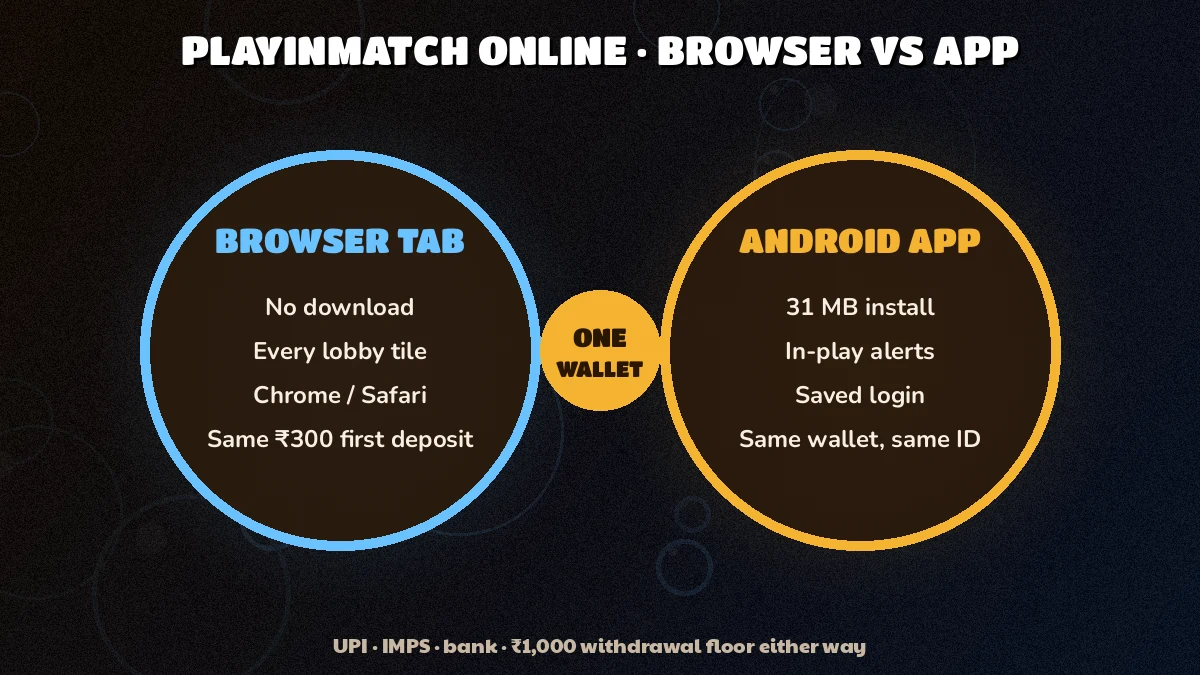
The app and the browser open the same PlayinMatch account. Same balance, same bet history, same 32 lobby tiles. What changes is how you get in, and what stays on your phone afterwards.
PlayinMatch in a browser tab
- Nothing to install
- Works on laptop, iPhone and Android
- Needs the latest address after a block
- Fine on a borrowed screen
PlayinMatch app
- 31 MB Android file to install
- Android 8.0 or newer only
- Opens from its own icon
- No iPhone version
So which one? For a single evening of cricket on a laptop, the tab wins without much argument. Someone who checks in-play prices a dozen times a day on the same Android phone might prefer the icon, and the PlayinMatch app features page lists what the installed version adds. File size and supported Android versions sit on the PlayinMatch app download page.
Plenty of people use both. App on the phone, a tab on the laptop, one ID across them, and bets placed on one show up on the other because the history is stored against the account. There is nothing to sync.
iPhone owners have no APK route at all. For them PlayinMatch online in Safari is simply the way in, with a home-screen icon if they want the look of an app. Not a workaround. It is the intended setup.
I had only ever used the app, until my phone went in for a screen repair. Opened the address on my brother's laptop, typed the OTP sent to the SIM, and the balance was sitting there. It took less time then finding his charger.
Moving between the PlayinMatch app and a tab mid-match
A bet placed in the app during the first innings can be watched from a laptop tab in the second. Open bets, settled bets and the running balance all read from the account, so the tab picks them up the moment you sign in. The only thing that does not travel is whatever you had typed into a bet slip and not confirmed yet.
If that laptop or phone is new to PlayinMatch, the OTP step comes first. Do it once before a big match rather than during one.
PlayinMatch online deposits and withdrawals from a tab
Money moves the same way in a browser as in the app. The deposit screen screen takes UPI, IMPS or a bank transfer, and withdrawals go only to a bank account or UPI ID in your own name, with a ₹1,000 floor per request. Timings and the daily request cap belong to the PlayinMatch payout timing page, so check there rather than trusting a number half-remembered from somewhere else.
What the tab changes is small but real: if you pay from a UPI app on the same phone, the browser goes to the background while you approve the payment. Come back to the PlayinMatch tab afterwards and give it a reload if the balance has not moved yet.
PlayinMatch online checks on a new device
Every new phone or laptop that opens your account gets an OTP first, which is the reason a tab on a friend's laptop is not an open door. Payouts also follow the same-name rule wherever you request them from. Larger accounts meet document checks only after ₹50,000 in cumulative withdrawals; the is PlayinMatch safe page goes through those checks one by one.
Real PlayinMatch Online Cricket Markets Without Installing Anything
Nobody needs the app to trade a match. Open Cricket from a PlayinMatch tab and the full exchange board is there: back and lay columns, fancy and session lines, a stake box and a bet slip, squeezed onto a phone screen or stretched across a laptop where more of the PlayinMatch markets fit before you scroll.


Exchange stakes start at ₹100. How backing and laying actually work is covered on the PlayinMatch exchange page; this page will not repeat it.
Football and tennis sit alongside cricket under Live Sports, and the number of in-play matches changes from one day to the next. The PlayinMatch in-play match list keeps track of what is open, while the PlayinMatch live score today board refreshes every 30 seconds.
Placing a PlayinMatch online exchange bet from the tab
The flow is short enough to keep in your head:
- Open Cricket in the lobby and pick the match.
- Tap a back price if you think the side wins, a lay price if you think it will not.
- Type the stake. ₹100 is the least the PlayinMatch exchange accepts.
- Place it and watch the PlayinMatch balance line. The stake (or, on a lay, your liability) is held back at once, and that drop is the quickest proof the slip went through.
If the slip reports that the price has changed, the market moved while you were typing. Accept the new price or cancel. Nothing is lost either way, and on a phone tab this happens more often during the last few overs than at any other time.
PlayinMatch online in-play on a patchy signal
In-play prices move quickly, and a tab is only as fast as the connection underneath it. When the price changes between your tap and the confirm button, its the market moving, not the browser failing. Reloading rarely fixes that.
Two habits help more. Keep the PlayinMatch tab in front while a bet is going through, because most phone browsers slow down tabs that sit in the background. And close the six other tabs you forgot about; each one competes for the same signal.
Fancy and session lines deserve a mention here too. On a busy match the PlayinMatch exchange can list a long column of them, runs by a certain over, a batter's score, the next wicket, and on a phone that means a lot of scrolling between the price and the slip. A landscape tab helps a little. A laptop helps a lot.
Long formats are where the laptop earns its place. A one-day game or a Test session runs for hours, and a PlayinMatch tab left open on a laptop is easier to glance at than a phone that keeps locking itself.
PlayinMatch Online Casino Tables and Slots, Latest Lobby in the Browser
Live dealer tables stream video, which makes them the heaviest thing a PlayinMatch tab will ever load. They still open without an app. Card tables and wheels sit one tap away from the cricket board and draw on the same balance.


Slots are lighter. They are mostly animation rather than video, so on a weak connection they tend to start faster than live tables do. Sound usually begins muted on mobile browsers until you tap the game once, which is the browser's rule and not a PlayinMatch setting.
The PlayinMatch casino table list goes deeper on dealers and round timings. From the browser side there is really one thing to know: keep the tab in front while a round is running. Jump across to WhatsApp for a minute and some phones will freeze the video; come back, the table reconnects, but you may have missed the the result screen and have to check your history instead.
Live tables also run on a countdown. Teen Patti gives a short betting window before the cards come out, and the chip only lands if you tap before that timer ends. On a laggy connection the video can trail the real table by a second or two, which is plenty to miss a window. When that happens the stake is normally normally just not placed, and the PlayinMatch balance stays where it was. Annoying, not costly. The bet history in the tab lists every hand you did play, with the result beside it.
PlayinMatch online crash rounds and slot studios in a tab
The Crash category, where a multiplier climbs until it stops, works in a browser as well. Aviator by Spribe is the one most people know. Its two bet slots and why predictor apps fail are explained on the PlayinMatch Aviator page, and the studio list for slots lives on PlayinMatch com slots.
A small practical point for crash games in a tab: auto cash-out is set inside the game, not in the browser, so it keeps working even if your signal wobbles for a second. Manual cash-out does not have that cushion. On a diffrent network, say a train, the auto setting is the calmer choice.
Short version of this whole section? If it is in the PlayinMatch lobby, it opens in the tab.
Quick PlayinMatch Online Search Notes in Three Tabs
People type playinmatch online when they want the account without installing anything. PlayinMatch online play means the full lobby inside Chrome or Safari, on a phone or a laptop, with the same balance the app shows.
- PlayinMatch online without app: open the address, sign in, play
- PlayinMatch online on iPhone: Safari, with an optional home-screen icon
- PlayinMatch online on a laptop: a wider cricket board, same ID
The PlayinMatch online site address can change after an ISP block, and the desk shares the fresh one. PlayinMatch online login uses the same username and password on every address, with an OTP on a new device.
- PlayinMatch online ID: created over WhatsApp, used in any browser
- PlayinMatch online login link: always the latest one from the desk
- Blocked PlayinMatch online address: same account on the new link
PlayinMatch online cricket covers exchange back and lay plus fancy and session lines from ₹100, while PlayinMatch online casino tables, slots and crash games load from the same lobby. A PlayinMatch online first deposit starts at ₹300, and everything is paid from one balance.
- playinmatch online
- playinmatch online login
- playinmatch online id
- playinmatch online play
- playinmatch online site
- playinmatch online cricket
- playinmatch online casino
- playinmatch online without app
- playinmatch online kaise khele
Easy Answers for PlayinMatch Online Browser Players
Does PlayinMatch online need any download?
No. PlayinMatch online runs inside Chrome or Safari, so nothing is installed on your phone or laptop. You open the current address, sign in with your username and password, and the same lobby and balance load in the tab. The Android app stays optional for people who prefer an icon.
Which browser works best for PlayinMatch online?
Chrome and Safari are the two to use. Chrome covers Android phones and laptops, while Safari covers iPhone and iPad, where no app exists at all. Keep the browser updated and allow cookies for the PlayinMatch address, otherwise the tab may sign you out after each refresh.
What should I do if the PlayinMatch online address is blocked in my browser?
Get the newest link from the PlayinMatch WhatsApp chat and open it in the same browser. A failing bookmark usually means an Indian ISP has blocked that domain, not that your account changed. Sign in on the fresh link with the same ID and password, then update the bookmark or home-screen icon.
Can I play Teen Patti or a slot straight from the PlayinMatch tab?
Yes, both load inside the tab, as do crash games and the other dealer tables. Teen Patti streams video, so it wants a steadier signal than a slot or the cricket exchange. Keep the PlayinMatch tab in front while a hand is dealt, since phones may pause video in background tabs.